Groups
It's common to need to start multiple tasks in a loop - for example:
import coflux as cf


@cf.task()
def my_task(i: int): ...


@cf.workflow()
def my_workflow(n: int):
    for i in range(n):
        my_task(i)
But starting a large number of tasks can make it difficult to navigate the graph in Studio — especially when those tasks are themselves starting other tasks. To make the graphs easier to navigate, Coflux has the concept of task groups.
A group can be created using a context manager:
@cf.workflow()
def my_workflow(n: int):
    with cf.group("My tasks"):  # ←
        for i in range(n):
            my_task(i)
Now all of the steps will be assigned to the group. In Studio, only one step from the group will be displayed at a time.
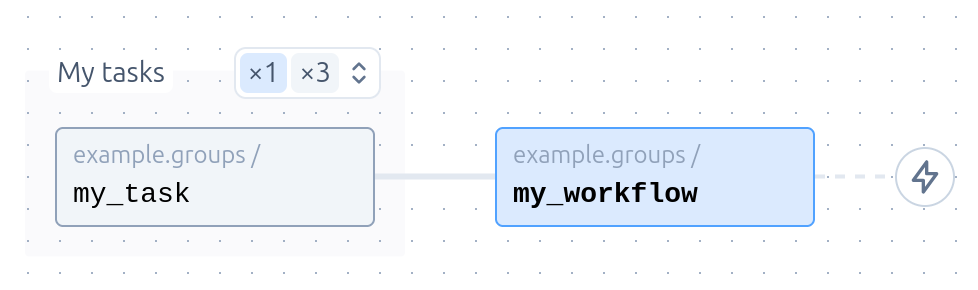
The name passed to cf.group(...) is optional, and simply serves as a way to label the group in Studio.
Note that steps can be run in parallel by 'submitting' them:
@cf.workflow()
def my_workflow(n: int):
    with cf.group("My tasks"):
        for i in range(n):
            my_task.submit(i)  # ←
See the parallelism page for more details.
Map-reduce
A map-reduce-style pattern can be used to split work up to be processed by separate workers, and then combining the results together.
For example:
@cf.workflow()
def wordcount_workflow(n: int = 10, k: int = 5):
    with cf.group("Process chapters"):
        executions = [process_chapter.submit(i) for i in range(n)]
        chapter_counts = [e.result() for e in executions]
    merged = merge_counters(chapter_counts)
    return Counter(merged).most_common(k)
Heterogeneous groups
Tasks that are called within a group don't need to be the same:
with cf.group("My tasks"):
    for i in range(n):
        if i % 2 == 0:
            even_task(i)
        else:
            odd_task(i)
Multiple groups
Multiple groups can be defined within a task, and tasks can be called outside of a group:
@cf.workflow()
def my_workflow():
    with cf.group("First group"):
        first_task()
    with cf.group("Second group"):
        second_task()
    third_task()
Limiting concurrency within a group
A group can also cap how many of the children submitted inside it run at once:
@cf.workflow()
def main(urls):
    with cf.group("fetch", concurrency=2):
        executions = [fetch.submit(url) for url in urls]
    return [e.result() for e in executions]
At most two fetch executions run at a time. The rest stay in the queue without
occupying a worker slot or causing a worker to be launched, exactly as with a
task-level limit. concurrency=0 (the default) means no limit.
The two kinds of limit are complementary. A task limit protects a resource (an API, an index) and applies to every execution of that task in the workspace, wherever it was submitted from. A group limit bounds fan-out from one caller, and applies only to that group. A child can be subject to both, in which case it's admitted only when both have room.
Some details worth knowing:
- Direct children only. Tasks that a child submits in turn aren't counted — they belong to the child's own groups, if any. Siblings submitted outside the group aren't counted either.
- One group of one parent execution. Each execution of the parent registers its own groups, so two runs of the same workflow don't share an allowance. If the parent is retried or resumed after suspending, children it submits afresh go in the new attempt's groups; re-submissions that are memo hits keep the group they were first put in, so a limit stays in force across a suspension.
- The limit outlives the parent. Once the parent returns, its remaining children are still admitted only as running siblings finish.
- Re-runs stay in the group. A child re-run in the same workspace waits behind its running siblings like any other. Re-run in a derived workspace, it counts against the group only alongside other re-runs there — limits are per workspace.
- Memo and cache hits don't count. An execution that was started by some other caller and merely linked into the group never took a place in it.
- Nested groups. Only the innermost group applies to a child.
- Child workflows submitted in the group are gated at the first step of the run they spawn, so the limit means what it says for them too.
As with a task limit, a child that holds a place in the group and then synchronously waits on a sibling that's gated behind it will wait forever. See deadlocks.